
Video Overlay is a method by which computer-generated images are superimposed on video. Properly transformed images appear as if they are an integral part of the scene without impeding the video of the actual environment.
PROTEUS-UHD is designed for overlaying texts, images and data onto 2K & 4K video. This is useful for broadcasting, surveillance, mapping applications, or real-time monitoring where such overlays provide critical contextual information.
PROTEUS-UHD support for HDMI1 2.1 ensures high-resolution, high-bandwidth video compatibility, making it ideal for modern displays and broadcast systems. Additionally, the fact that it operates independently of a computer simplifies deployment, making it more reliable for standalone applications.
PROTEUS-UHD offers advanced functionality through additional widgets3, but its core capability remains straightforward—handling text, image, and GPS data insertion efficiently.
PROTEUS-UHD comes with two companion Apps:
- ProteusWizard – a WYSIWYG designer for on-screen displays (OSDs). Drag-and-drop widgets – Text, Parameter, Image, Gauge, Slider, Compass, and Up/Down Timer – onto the canvas, then fine – tune properties such as font, color, and position.
- ProteusApp – a utility for downloading configuration files, simulating sensor data, and practicing drawing commands via RS-232 or Ethernet
To Download Our Brochure & Manuals, Click Here.
Typical Interconnect Diagram
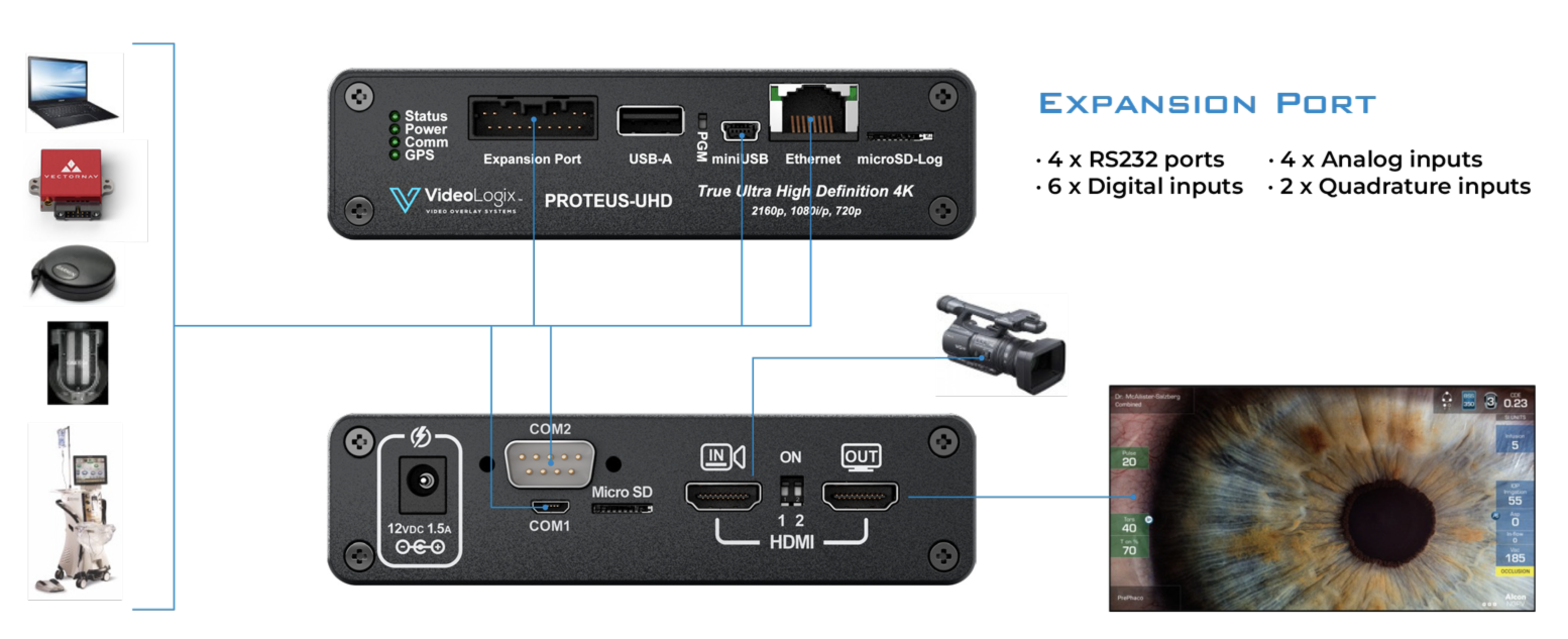
Applications
- Overlay time, date, & images
- Point of sale (POS)
- Medical & Scientific
- Timestamping Courtrooms
- Count up/down timer
- Security and Surveillance
- Reticle
- Many more…
PROTEUS-UHD Specifications
| General Features |
|---|
| Full Ultra High Definition Video Overlay |
| Stand-alone operation i.e. no PC required |
| Windows based app ProteusWizard for designing your OSD |
| Windows based app ProteusApp for simulating data sensors and practicing drawing commands via RS232 or ethernet |
| Overlay data from any GPS modem ($GPRMC, $GPGGA, $PTSAG, etc.) |
| Overlay data from any NMEA 0183 strings ($GPWPL, $SDDPT, $SDDBT, $WIMTW, $WIMWV, $VNINS, $VNIMU, $VNYPR, etc.) |
| Overlay data from any CSV strings received via RS-232, USB, Ethernet |
| Overlay texts and PNG images |
| Built-in Compass and Tilt (Pitch & Roll) sensors |
| User configurable fonts |
| Over 30 drawing commands through RS232, Ethernet, USB |
| Battery backed up real time clock (RTC) |
| Per pixel alpha blending |
| OSD resolutions: 3840 x 2160, 1920 x 1080, 1280 x 720 |
| Video |
| Supports HDMI 2.1 Video |
| HDMI input |
| HDMI output |
| 2160p @ 23.97, 24, 25, 29.97, 30, 50, 59.94, 60 Hz |
| 1080i @ 50, 59.94, 60 Hz |
| 1080p @ 23.98, 24, 25, 29.97, 50, 59.94, 60 Hz |
| 720p @ 50, 59.94, 60 Hz |
| Fast video input to output delay |
| Ports |
| 4 x RS232 |
| 1 x CAN interface |
| 1 x Micro USB Device |
| 1 x Ethernet 10/100 (Static or DHCP IPv4 addressing) |
| 1 x IRIG-B |
| 5 x GPIs 4, each capable of controlling the ON/OFF state of any graphic widget or triggering and controlling the count up/down timers |
| Additional Features |
| Analog Inputs: Convert analog inputs to speed, depth, pressure… 2 |
| Quadrature Inputs: Convert count to distance, speed… |
| Supported Devices: VectorNav INS, GPS sensors, any sensor with CSV string output |
| Built-in Widgets: ROV & Aerial situation awareness, Compass, Slider, Count up/down timer |
| Others |
| Box Dimensions (mm) 167 x 129 x 34 |
| Weight (525 grams) |
| Power (12V DC, 1.5A via 2.1mm x 5.5mm jack) |
| 2-year warranty |
| Recommended Operating Temperature Range: 10-40°C |